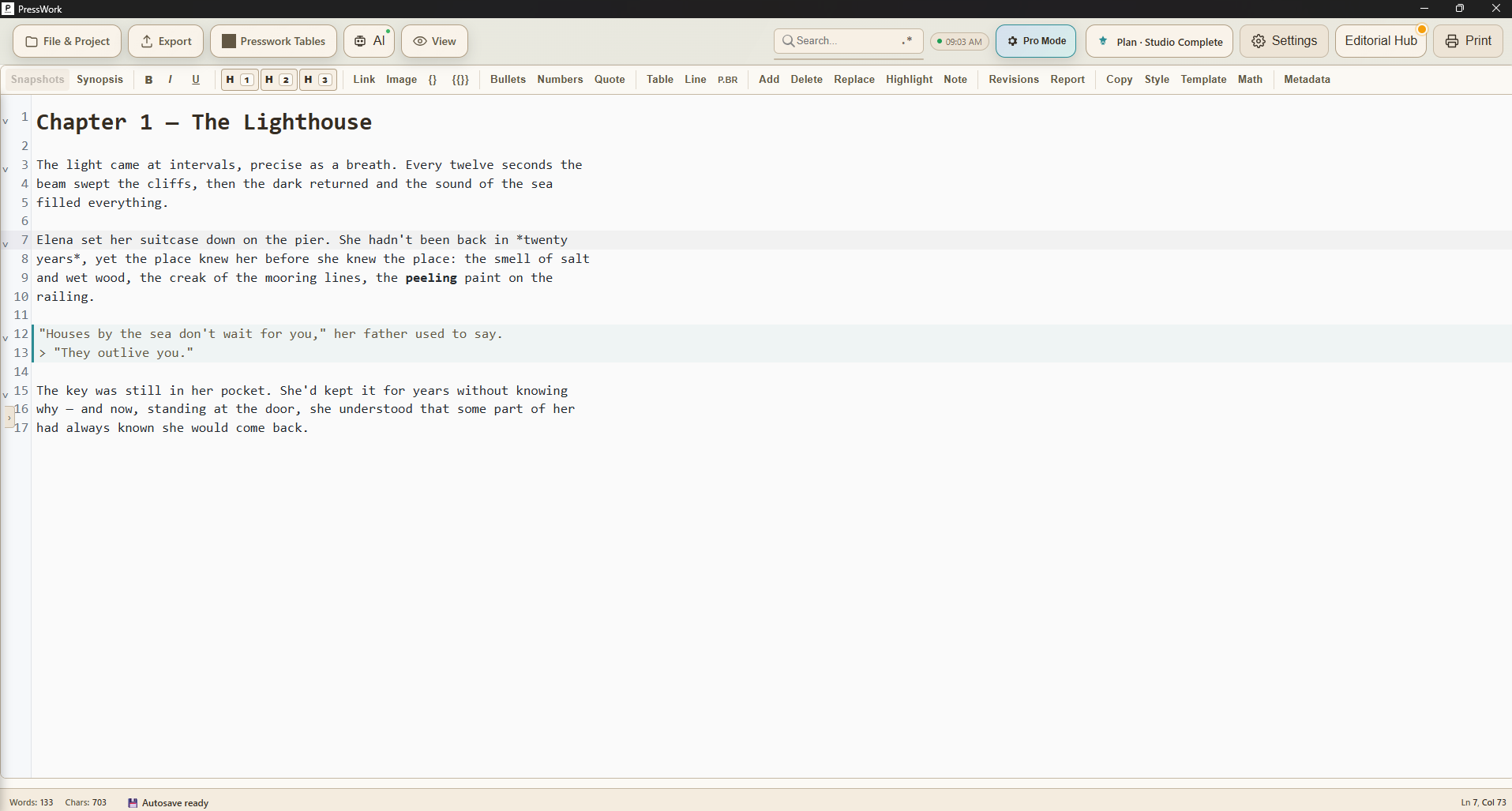
It grows with every release. Here's what you can do today.
PressWork is available for Windows, macOS and Linux. The latest updates up top, the foundations of the 4 series below. Note for 3.7 users: the update requires a one-time manual download — from 4.0 onwards the app updates itself.
One thing we are working on. No date: when there is one, we will say so.
A preview channel for people who bought
Anyone with a licence will be able to choose to receive versions in preview, before they come out for everyone.
PressWork 4.5 — 25 September 2026
Your book already written somewhere else? It now comes into PressWork with its structure, its images and its links.
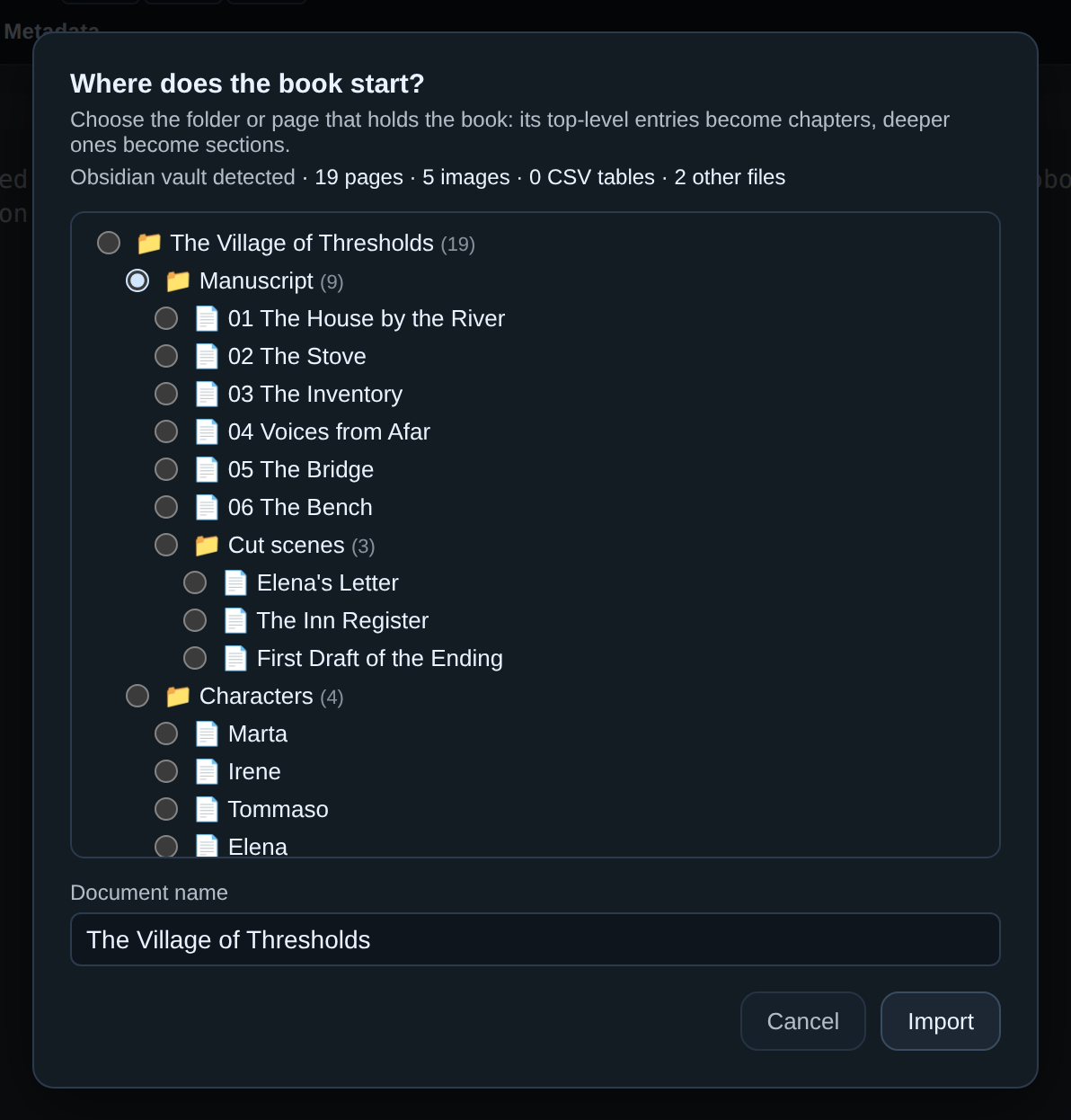
Bring your book in from Notion, from Obsidian, from a folder of notes
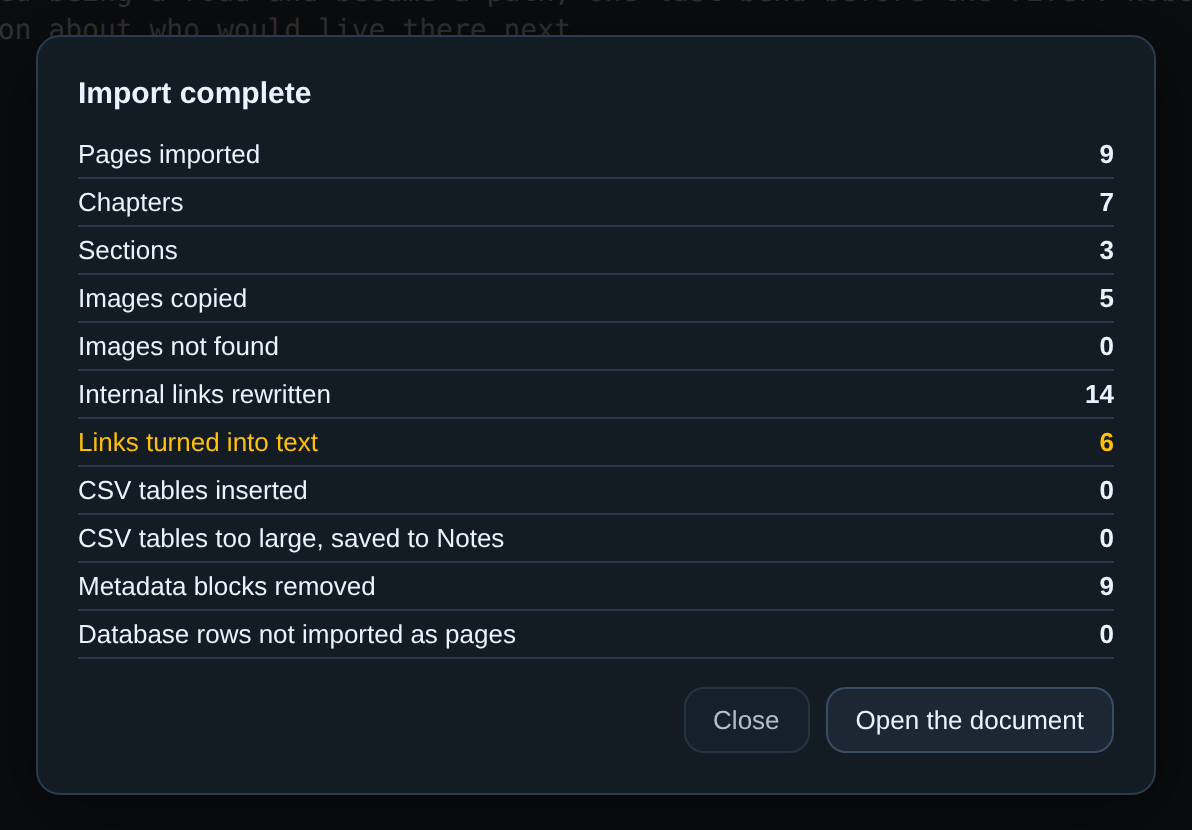
File & Project → Import Markdown folder: you choose the folder, PressWork shows you the tree of what is inside and asks where the book begins. Top-level entries become chapters, images come into the document, links between pages become cross-references. It recognises Notion and Obsidian by itself, but it works with any tool that exports Markdown. At the end a report says what was imported.
Three gestures that make everyday work more direct
“Save as…” makes a copy of the file, or a full duplicate of a PressWork document. “Export as…” lets you choose the name and folder of the PDF or the Word file, and that name is remembered. And a double click on a .md file opens it in PressWork, even when the app is already open.
Exports even closer to the preview
PDF, PDF/X, Word, ODT, ePub and HTML carry line breaks, lists, headings and symbols across with more care.
Free update for anyone on the 4 series: it arrives by itself the next time you open the app.
The tidying-up release: scaffolding out, and in come the things that matter to anyone writing against a deadline.
Deadlines move into the Table
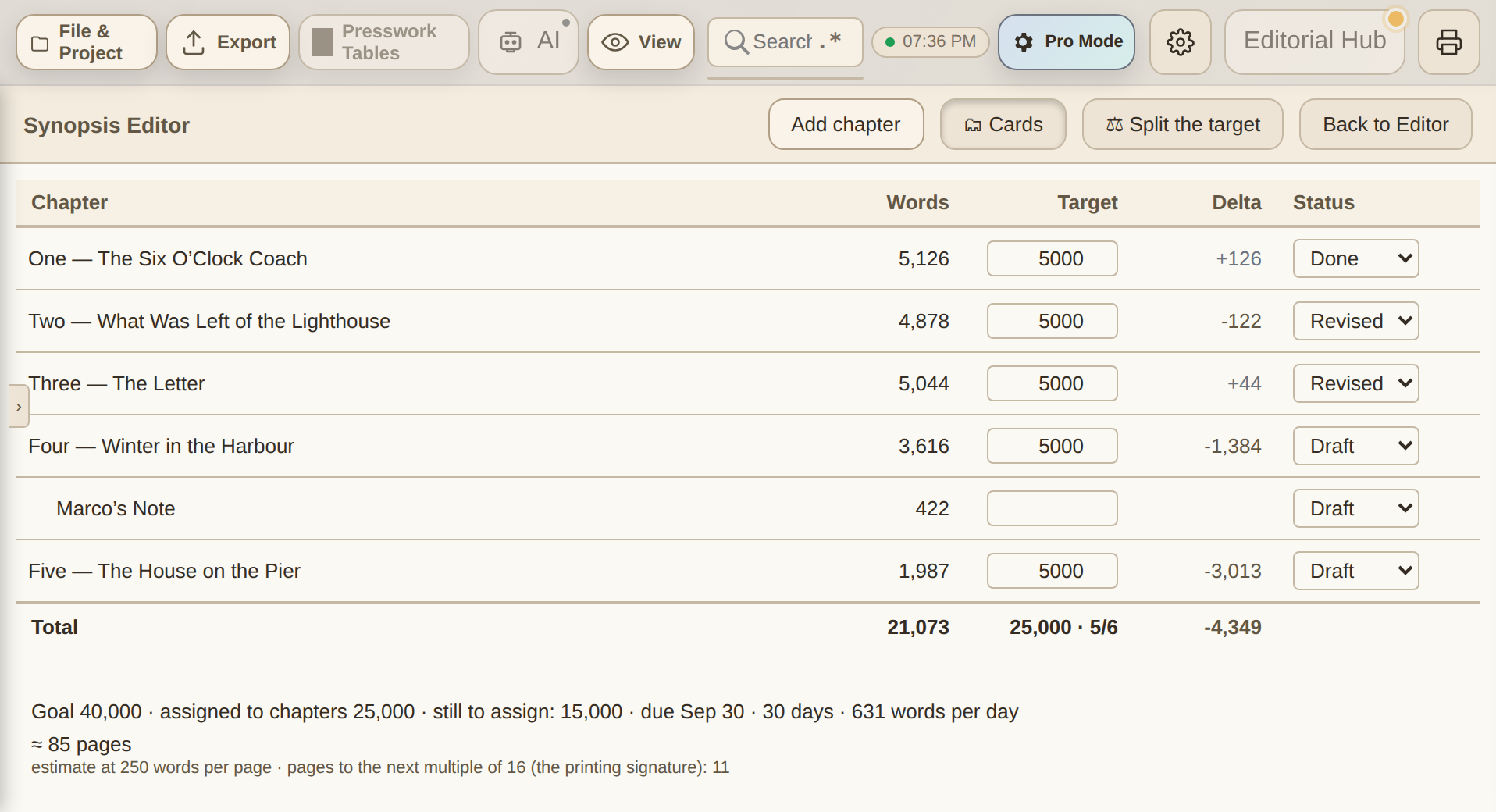
Goals take a delivery date — optional: leave it out and nothing changes — and the Table footer does the arithmetic that counts: how many days are left, how many words a day it takes to get there. No calendar, no reminders: just the pace, where you're already looking. And once the goal is met it goes quiet, because the silence is the good news.
The assistant tells your language from the book's
Write a novel in English with the app set to Italian, and the explanations come in Italian while the prose stays in English. Two languages, two jobs — and it's the case for anyone translating or publishing outside their own language.
Updates explain themselves
The window offering the update used to belong to the system, and spoke Italian to everyone. Now it belongs to the app, in all nine languages: it tells you which version is coming and which one you have, and lets you read what changes before you decide. «Later» becomes an informed choice instead of a shot in the dark.
Two things that cost time and scattered files in an ordinary editor: PressWork automates them.
Chapter variants
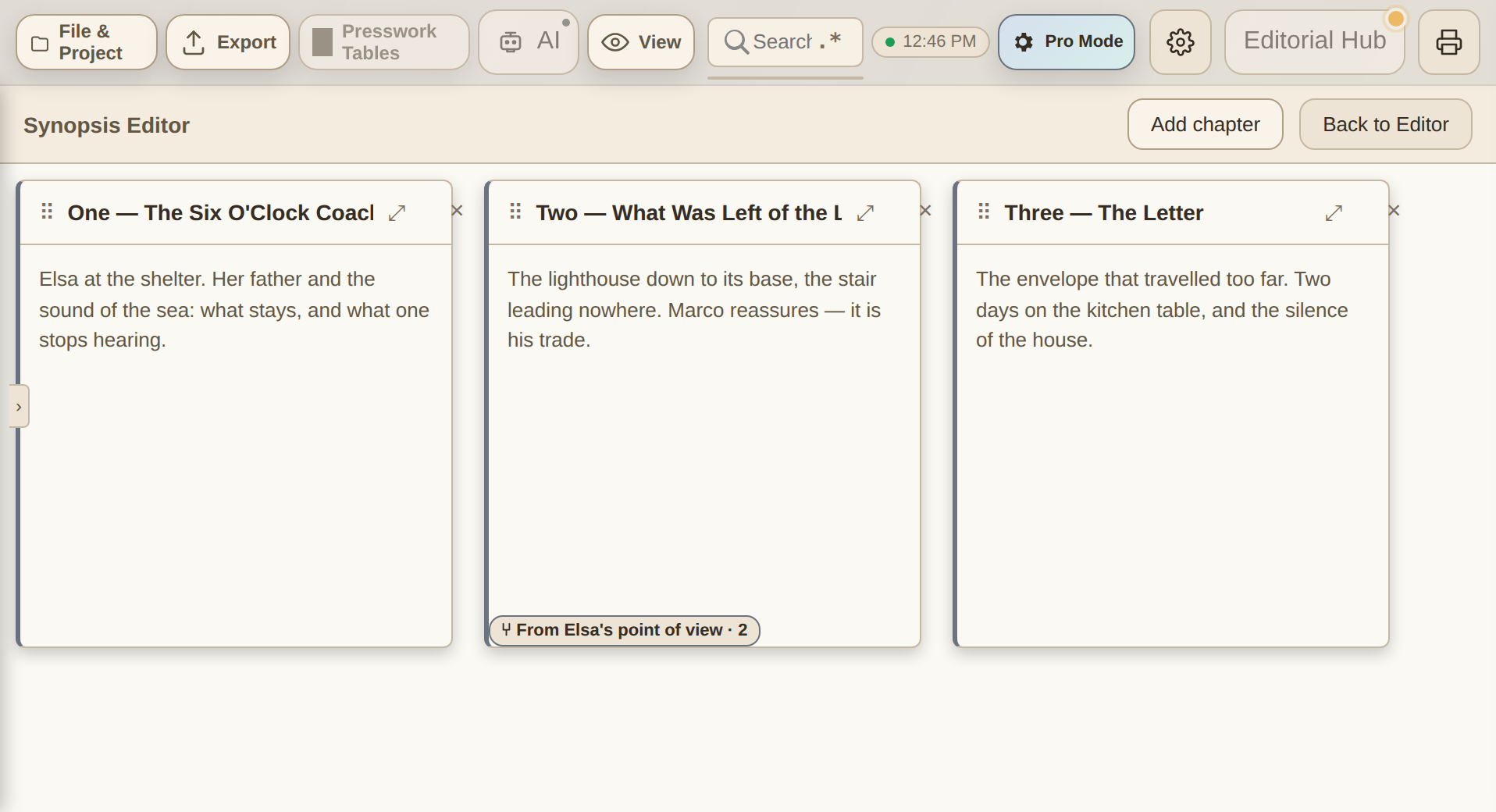
Screenwriters already know the idea: in Final Draft you keep several versions of the same line and only one reaches the page. PressWork brings it to the scale of a book. On paper this was crossing a passage out and rewriting it alongside. Here the drafts live inside the same chapter: in the Synopsis you hover over the card and click ⑂, what was there becomes «first draft», and you give the new one a name. One is live at a time, you swap it with a click, and the export always carries the one you want.
You try another road without losing the first one
A branch is an alternative version of the whole book: you change the ending, drop a character, rewrite the structure — and the main document stays untouched. A variant is one chapter written several times over; a branch is another book. The risk, at that point, isn't losing work: it's writing in the wrong place while believing you're somewhere else. That's why a pill in the status bar always tells you which branch you're in — on the main document it isn't there, and its absence is itself the information. It's what GitHub branches gave to code: branches of a whole manuscript, inside the file, without Git. Scrivener has snapshots and Ulysses version history — the past kept safe, not two live roads running side by side.
Your manuscript can be read by your own AI assistant, on your computer, with no copy-paste and without uploading it anywhere. And the road to InDesign now has a way back too.
Three gestures, once
1Settings → AI → Connect an assistant (MCP) → «Configure for me» (Claude Desktop, Codex CLI or Gemini CLI).
2The folder of the open project is connected, with all its .pwk files. Configure from other projects and the folders add up.
3Close and reopen the assistant. From then on it works even with PressWork closed.
What it doesn't do
Read-only: the connector has no tool to write to your files.
Before touching another application's configuration it makes a backup copy of it.
What the assistant reads is sent to its cloud service to produce the answer — like a copy-paste, but automatic. If you wouldn't paste a project into a chat, don't connect it.
InDesign opens it as if it had made it
The ICML export follows the schema InDesign uses for its own files: footnotes, links, tables, images as linked placeholders, superscript, subscript and small caps all land in place — nothing to redo by hand. And now the road has a way back: an ICML reopened in PressWork preserves the document, with the round trip verified on every build.
How to update
If you have an earlier version, accept the prompt at startup: about fifteen seconds. From scratch there are five packages — Windows x64 and ARM, macOS Intel and Apple Silicon, Linux deb/rpm/AppImage — with a Linux floor of glibc 2.35 (Mint 21.3 / Ubuntu 22.04 and up).
The text is never only the text: there are the notes, the research, the earlier chapter you need to check again. 4.1 put all of that beside the manuscript, inside the same file.
Notes, research and character sheets, inside the document
A three-tab panel — Notes, Research, Characters — that lives inside the .pwk and never ends up in the exports. With «Reference» you open a second chapter or a note beside the text and keep it in view while you write: it isn't one more window to manage, it's the same window split in two.
Screenwriting gets serious
Real dual dialogue in the Final Draft export, production tags that survive the round trip, scene numbers and extensions. The FDX round trip is checked on every build: what goes out, coming back in, is still the same thing.
This is the version where the heart of the app was rebuilt from nothing. Everything that came afterwards rests on it.
A new editor, and you can tell
Bold, headings, lists and images take shape inside the text as you write — no separate panel to watch. Images are dragged where you need them, chapters fold away, the active line can stay centred like on a typewriter, and at a hundred thousand words it doesn't slow down.
From here on it updates itself
When a new version comes out the app offers it: one click and you're up to date. Anyone coming from 3.7 does one last manual download, and never again.
Share the document and write together live: you see each other's cursors, you talk over video inside the app, you comment. And the file stays on your computer — no text on anyone's server.
📤
The exports your printer asks for
Certified PDF/X-4 for the press, validated ePub for Kindle and the stores, DOCX for people working in Word, ICML with the styles already assigned for InDesign. They're built on every save, not on command.
🖋️
Signing with a certain date
Sign a PDF — or a whole folder at once — with an RFC 3161 timestamp. You prove that text was yours on that date, with no notary.
📦
Ready for Amazon (KDP)
While you write, PressWork checks margins, spine and image resolution for Amazon KDP. You find the errors before uploading, not after the rejection.
📊
Data, tables and documents in bulk
Import an Excel sheet and turn it into tables or charts in the document. With «Generate batch», in the Business Hub, every row of the sheet becomes a document: letters, invoices, contracts, all at once.
🗂️
The binder: Notes, Research, Characters
Notes, research and character sheets live next to your manuscript, never in exports. And with «Reference», keep another chapter or a note in view while you write.
⚙️
AI automations (beta)
Set a threshold and an instruction: as the text grows, the app suggests — never on its own, never on your source. All on the local AI, offline.
🌍
Interface and guide in 9 languages
App, manual and in-app guide in Italian, English, Spanish, French, German, Chinese, Russian, Arabic and Hebrew — with the right typography for each.
✍️
New editor
The heart of the app has been rewritten: faster, more stable, ready for the future.
👁️
Live preview
Bold, headings, lists and images take shape right in the text as you type. No separate panels.
🤖
Built-in AI, zero setup
The AI assistant is built in: one click to download the model and it just works, fully offline. Runs even on older computers.
🖼️
Images in the text
Photos appear in the manuscript; drag them to move them anywhere.
🎬
Studio-grade screenwriting
Screenplay mode with Final Draft (FDX) export and a full round trip: authentic dual dialogue, production tags that survive the trip, scene numbers and V.O. extensions.
✅
Spell check & style
Multilingual spell checker; repetitions and filler words highlighted live, with a hover explanation.
🖨️
Printing that works
The Print button builds a PDF with the same typography as your exports and opens it in your system viewer: a faithful preview, every time.
🔄
Automatic updates
From this version on, the app offers you new updates by itself: one click and you're up to date.
⚡
Fast on long documents
Virtual rendering: no slowdown even past 100,000 words.